
Use project chat and hand work to agents
Choose a conversation, model, and mode; attach file context deliberately and inspect delegated work.
On this page
Chat keeps conversations associated with a project. Use it to discuss design or understand code; use an agent task when you want a change to be carried out and inspected.
Send a focused question
Select the intended project and conversation. Create a new chat when you need a separate discussion. Choose Auto route or an eligible model and keep Chat mode selected for an answer.
Enter sends a message; Shift+Enter creates another line. If you enable Attach active file, check the selected file first. Selecting a project does not automatically attach its entire directory to the request.
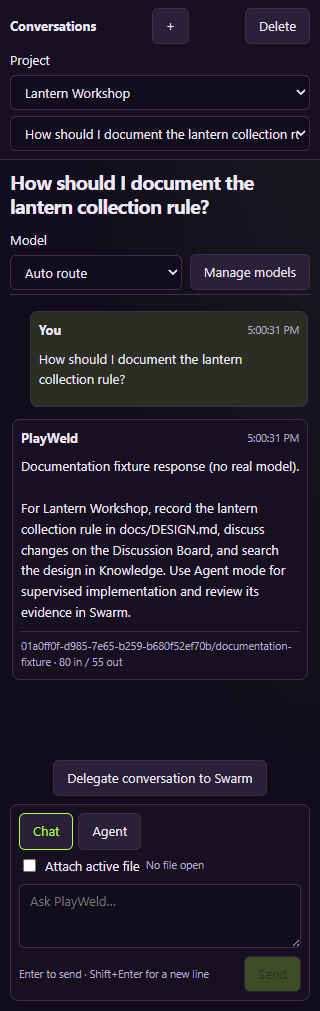
The shown answer comes from a scripted local provider. It illustrates routing and conversation storage, not AI reasoning quality.
Ask for a result you can check
A useful question names the relevant file and the uncertainty: ask how reset behavior in game/main.gd relates to your design, rather than asking the model to understand an unspecified game. Check the answer against those files.
If a response is pending when you switch conversations, use the pending-status information to return to the original conversation and inspect its result. Creating another request does not complete the first one.
Move implementation into supervised work
Choose Agent mode for a task, or use Delegate conversation to Swarm for a prior request. Name the affected files, expected behavior, constraints, budget, and acceptance checks. A proposed code snippet in Chat is not a completed workspace edit.
Review the resulting task in Swarm: questions, approvals, changed files, evidence, and integration each need attention. Continue with reviewing agent changes and understanding access controls.